
Manage Multiple WhatsApp Accounts on iPhone
Is Whats Second Messenger Web App compatible with all iPhone models?
Compatibility information was partially provided. The app is designed for iPhone users, but specific model requirements were not listed. Users should ensure their device meets general iOS standards for app installation.
Is the app safe to use with WhatsApp accounts?
The app operates independently and is not officially affiliated with WhatsApp LLC. It adheres to fair use guidelines to enhance user experience. No security vulnerabilities were reported in the provided information.
How often are updates released?
Update frequency was not specified. The current version is 1.0, and users should check for updates through the official distribution channel.
What type of license does the app use?
The licensing model was not disclosed. The app is available at no cost, and users are encouraged to review the terms of use for details on usage rights.
Can I use the app offline?
Information on offline functionality was not provided. The app may require an internet connection for core features, especially those involving account switching and content sharing.
Overview
Whats Second Messenger Web App is a free social networking tool tailored for iPhone users seeking to manage multiple WhatsApp accounts from a single device. Designed to eliminate the need for additional hardware, it enables seamless switching between different WhatsApp profiles through a dedicated web interface. This solution addresses the common challenge of juggling personal and professional accounts, or maintaining multiple identities across social circles.
The app enhances communication by introducing creative tools that go beyond standard messaging, promoting personal expression and engagement. Key features such as "Emoji Tales," "Status Messages," and customizable visual elements like "Artful Emojis" and "Wallpaper" cater to users who value customization and emotional storytelling in their digital interactions. While not officially affiliated with WhatsApp LLC, the app operates under fair use principles to enrich the user experience.
It is particularly useful for content creators, social media managers, and individuals managing multiple digital identities.
Key Features & Capabilities
- Multi-Account Management: Switch between multiple WhatsApp profiles without requiring additional devices. Ideal for users with separate personal and professional numbers.
- Emoji Tales: Share emotions through copied emojis, allowing users to convey feelings in a visually expressive way.
- Status Messages: Discover and share imaginative, creative messages to enhance status updates and spark conversations.
- Artful Emojis: Customize emoji appearance for a more personalized messaging experience.
- Wallpaper Feature: Apply custom wallpapers to personalize WhatsApp’s background and create a unique visual identity.
These capabilities allow users to streamline their communication workflow while adding a layer of creativity to everyday interactions. For example, a social media manager can switch between client and personal accounts instantly, using unique wallpapers and emoji styles to maintain brand consistency. Similarly, a content creator can use "Status Messages" to share engaging, story-driven updates that stand out in a crowded feed. The app’s design encourages interaction through visual storytelling, making it more than just a functional tool—it becomes a platform for self-expression.
User Interface, Workflow & Performance
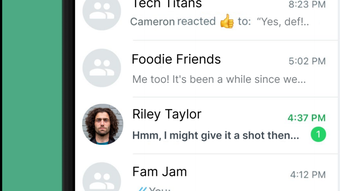
The app presents a clean, intuitive interface optimized for iPhone’s touch-based navigation. Users can access different WhatsApp profiles through a simple dashboard that organizes accounts and features. Navigation is straightforward, with minimal onboarding required.
The workflow is designed to reduce friction when switching between accounts or applying customization settings. While specific performance data was not provided, the app’s structure suggests efficient operation within standard iOS performance parameters. The developer did not specify resource usage details, so users should monitor CPU and RAM behavior during extended use.
Stability is expected to align with typical web app behavior on iOS, though real-world testing may reveal variations. No reported crashes or freezes were mentioned in the available information. The app’s reliance on a web-based interface may influence responsiveness depending on network conditions.
Compatibility & System Requirements
Whats Second Messenger Web App is designed for iPhone devices and requires iOS to function. The current version is 1.0, with an installation size of 100 MB. Exact system requirements were not listed, so users should ensure their device meets general iOS standards for app installation.
Compatibility with specific iPhone models was not disclosed. The app operates as a web application, which may reduce the need for high-end hardware. However, performance may vary based on internet connectivity and device capabilities.
The developer did not provide additional system requirements beyond the platform and version. Users should verify compatibility through official channels before installation.
Pros and Cons
Pros
- Free to use with no hidden costs
- Enables management of multiple WhatsApp accounts on a single device
- Offers creative features like Emoji Tales and Status Messages
- Includes personalization tools such as Artful Emojis and Wallpaper
- Designed for iPhone users with intuitive touch-based navigation
Cons
- Not officially affiliated with WhatsApp LLC
- Exact system requirements were not specified
- Performance under low network conditions was not detailed
- Update frequency is unknown
- Offline functionality is unclear
Final Thoughts + CTA
Whats Second Messenger Web App stands out as a practical, creative solution for iPhone users managing multiple WhatsApp accounts. Its focus on personalization and emotional expression through features like Emoji Tales and Status Messages adds a unique dimension to standard messaging. While it operates independently and lacks official backing, it adheres to fair use guidelines, making it a viable option for those seeking enhanced flexibility.
The free model, combined with intuitive design and customization tools, makes it accessible to a broad audience. Users who value both functionality and self-expression will find significant value in this tool. For anyone looking to streamline their WhatsApp experience while maintaining distinct digital identities, this app offers a compelling alternative.
Download Whats Second Messenger Web App now.







